One click to scrape LinkedIn group and export up to 10,000 members leads with email to CSV, Excel and JSON files.
Get started - it's free






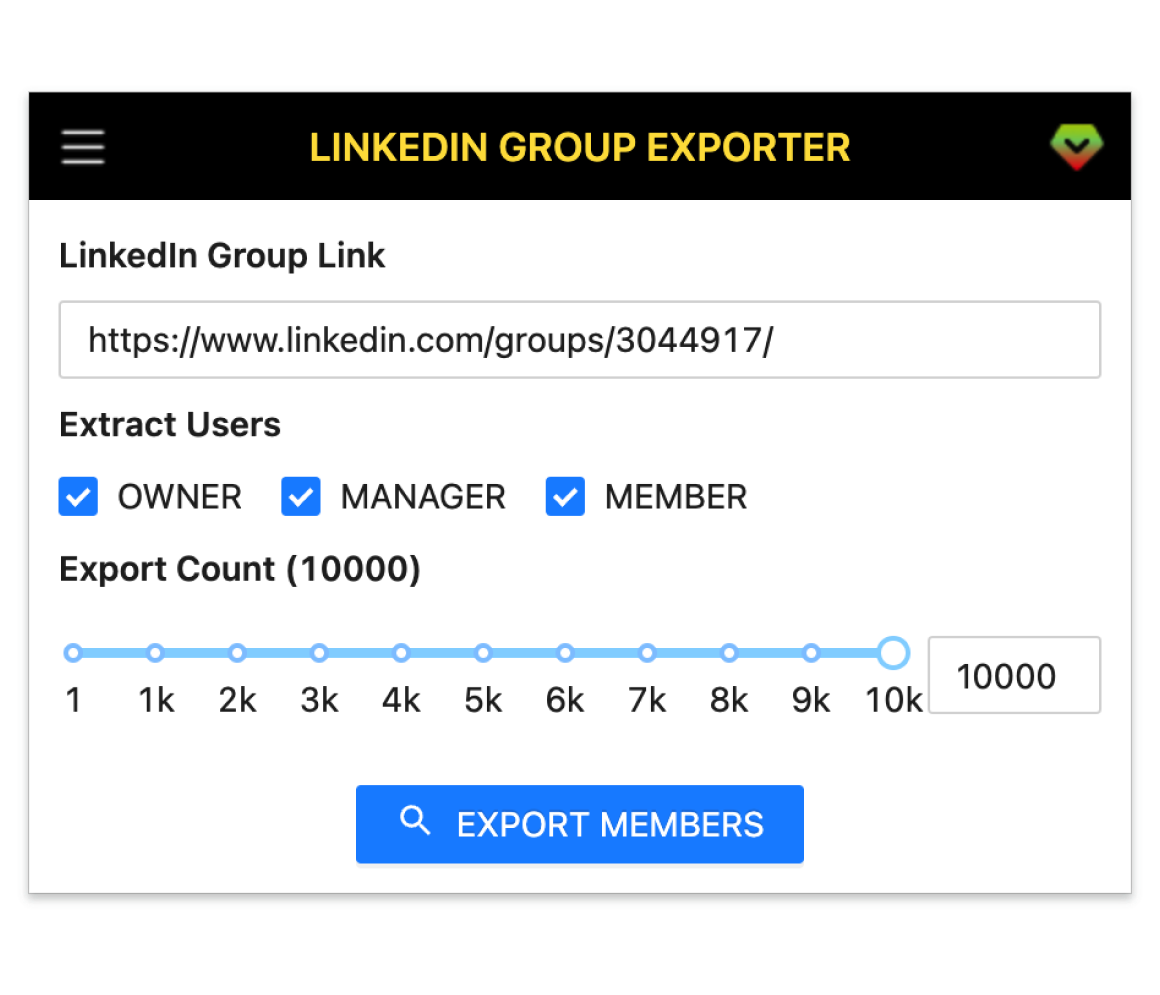
A smart tool to generate leads and followers on LinkedIn by exporting all the members leads with email of a LinkedIn group.
Scrape large LinkedIn groups reliably and export a massive member list in one go.
Capture company, school, headline and rich profile attributes for each member.
Enrich emails using Email Finder APIs like Apollo, Hunter, Snov, Datagma and more.
Target Owners, Managers or Members to refine your exports precisely.
Download clean datasets in CSV, XLSX or JSON for any workflow.
Get started in a few simple steps.
Add LinkedIn Group Exporter to your browser.
Open the extension, paste the group URL, choose filters, then start export.
Download results as CSV, Excel or JSON and save locally.
How teams use LinkedIn Group Exporter in their daily workflow.
Build targeted outreach lists from niche groups without manual copy‑paste.
Find candidates by role, industry or location and export profiles for follow‑up.
Understand your members, segment by role, and keep a clean roster for engagement.
Validate markets, collect early adopters, and run lightweight GTM experiments fast.
Invite relevant members from interest groups and track RSVPs with clean lists.
Export structured member data for competitive analysis and trend insights.
Fields included in exported datasets.
| Field | Description | Example |
|---|---|---|
| Public Identifier | Unique LinkedIn public handle. | john-doe-12345 |
| Profile Link | Direct link to the member profile. | https://www.linkedin.com/in/john-doe-12345 |
| First Name | Member given name. | John |
| Last Name | Member family name. | Doe |
| Full Name | Member full display name. | John Doe |
| Headline | Profile headline under the name. | Senior Growth Marketer at Acme Co |
| Picture URL | Profile avatar image URL. | https://media.licdn.com/.../profile.jpg |
| Open To Work | Whether member is open to work. | Yes |
| Degree | Network degree (1st, 2nd, 3rd). | 2nd |
| Member Status | Role or status in the group. | Member |
| Member Since | Date joined the group. | 2018-05-10 |
| Connections Count | Total connections count. | 500+ |
| Followers Count | Total followers count. | 4,200 |
| Following | How many the member follows. | 350 |
| Company Name | Current company name. | Acme Inc. |
| Job Title | Current job title. | Growth Manager |
| Employment Type | Type of employment. | Full-time |
| Company Industry | Industry of the current company. | Information Technology |
| Company Location | Company HQ or job location. | San Francisco, CA, USA |
| Job Date Range | Employment start–end. | Jan 2022 – Present |
| Company Employee Count | Company size band. | 201-500 |
| Company ID | LinkedIn company numeric ID. | 1234567 |
| Company Universal Name | Company handle on LinkedIn. | acme-inc |
| Company URL | Company profile URL. | https://www.linkedin.com/company/acme-inc/ |
| School Name | Education institution. | Stanford University |
| Degree Name | Degree obtained. | M.S. |
| Field Of Study | Major/field of study. | Computer Science |
| Education Date | Education year range. | 2013 – 2015 |
| Industry Name | Member self-selected industry. | Marketing & Advertising |
| Summary | Profile about/summary text. | Driving user acquisition and retention through data-driven campaigns. |
| Skills | Comma or semicolon separated skills. | Growth Marketing; SEO; Email Marketing |
| Certifications | Professional certifications. | Google Analytics; HubSpot Inbound |
| Projects | Notable projects listed. | Lead Gen Automation; ABM Playbook |
| GEO Location Name | General area/metro. | San Francisco Bay Area |
| GEO Country Name | Country name. | United States |
| Prefer Country Code | Preferred country code. | US |
| Prefer Language Code | Preferred language code. | en |
| Birth Date | Birthday if available. | 1990-07-12 |
| Is Creator | Creator mode enabled. | No |
| Is Influencer | LinkedIn influencer flag. | No |
| Is Premium | Has LinkedIn Premium. | Yes |
Where you can get answers to common questions about LinkedIn Group Exporter
You don’t have to take our word for it
I pulled 3,000 members from niche groups, enriched emails, and saw reply rates jump. The export is clean and took minutes instead of days.
Michael
Sales Development Rep
Built targeted lists from 5 groups and cut prospecting time by ~80%. We launched two campaigns the same week and hit pipeline goals early.
Jessie
Growth Marketer
Perfect for hard‑to‑reach roles. I exported qualified profiles from relevant groups and filled my pipeline in hours, not weeks.
Priya
Technical Recruiter
Segmented members by role and re‑engaged them with a newsletter. The roster export keeps my community ops organized and up‑to‑date.
Marco
Community Manager
Validated a niche by exporting members from 4 groups. Booked 120 demo requests in a month—easily the fastest way to test GTM hypotheses.
Lina
SaaS Founder
Invited the right audience from interest groups and doubled webinar RSVPs. The CSV/XLSX export drops straight into our CRM.
Daniel
Event Marketer
Exported a clean dataset for a competitive landscape report. What used to take days of manual copy‑paste now takes under an hour.
 Sophia
Market Analyst
Sophia
Market Analyst
Onboarded three campaigns using group exports in the first week. Easy, reliable, and a no‑brainer upgrade to Pro for us.
 Ahmed
Agency Owner
Ahmed
Agency Owner
Install the extension, paste a group link, and export up to 10k members to CSV with email.
7-day money-back guarantee. Cancel anytime.